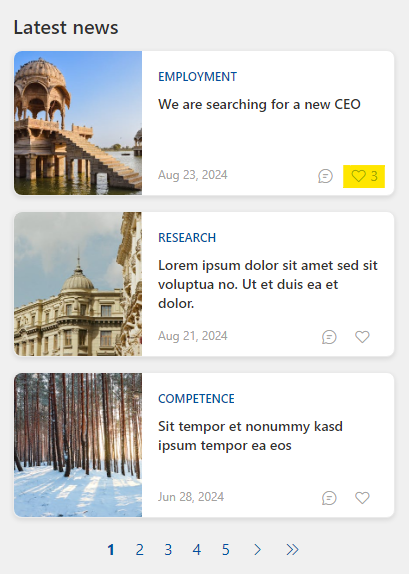
In this blog post, I will show an example of a LikesWebComponent as a search extension for the PnP Search Web Part. This component will allow users to like and unlike items for SharePoint items that are found and displayed in the PnP Search Web Part. The following image shows an example of the “Likes component” can be used in a news listing:
Prerequisites
- Basic understanding of React and TypeScript
- Familiarity with SharePoint Framework (SPFx)
- Node.js and npm installed on your machine
- SharePoint Online site
Step 1: Setting Up the Project
First, set up a new SPFx project using the Yeoman generator.
yo @microsoft/sharepoint
Step 2: Installing PnPjs
Install the PnPjs libraries required for interacting with SharePoint.
npm install @pnp/sp @pnp/spfx-controls-react @pnp/logging @pnp/common @pnp/odata
Step 3: Creating the LikesWebComponent
Create a new TypeScript file for your component, e.g., LikesWebComponent.tsx.
Step 4: Implementing the Component
Implement the LikesWebComponent by following these steps:
Import Dependencies
import * as React from 'react';
import { spfi, SPFI } from '@pnp/sp';
import { spSPFx } from '@pnp/sp/spfx';
import { PageContext } from '@microsoft/sp-page-context';
import { SPHttpClient } from '@microsoft/sp-http';
import { DataService, ILikedByInformation } from './DataService';
import LikesComponent from './LikesComponent';
Define the Component
export class LikesWebComponent extends BaseWebComponent {

    private _dataService: IDataService;
    private _sp: SPFI;
    private _spHttpClient: SPHttpClient;

    public async connectedCallback(): Promise<void> {

        /** Incoming properties */
        // sp-site-url: spSiteUrl
        // list-id: listId
        // item-id: itemId
        // icon-name: iconName

        // Get properties from the handlebar
        const props: any = this.resolveAttributes();

        console.log("PROPS FROM HANDLEBAR", props);

        // Get the service scope from the base web component
        this._serviceScope.whenFinished(async () => {

            // Get the page context and SPHttpClient  from the service scope
            const pageContext = this._serviceScope.consume(PageContext.serviceKey as any) as any;
            this._spHttpClient = this._serviceScope.consume(SPHttpClient.serviceKey as any);

            console.log("PAGECONTEXT", pageContext);
            // Get the SPFI object using the pageContext object
            this._sp = spfi().using(spSPFx({ pageContext }));

            // Initialize the dataservice using the component site url
            this._dataService = new DataService(this._sp, null, null, props.spSiteUrl, this._spHttpClient);

            const _likesInfo: ILikedByInformation = await this._dataService.getLikedByInformation(props.spSiteUrl, props.listId, props.itemId);

            const likeItem = async (): Promise<void> => {
                try {
                    await this._dataService.likeItem(props.spSiteUrl, props.listId, props.itemId);
                }
                catch (error) {
                    console.error("Error liking item", error);
                }
            };

            const unlikeItem = async (): Promise<void> => {
                try {
                    await this._dataService.unlikeItem(props.spSiteUrl, props.listId, props.itemId);
                }
                catch (error) {
                    console.error("Error unliking item", error);
                }
            };

            const customComponent = <LikesComponent
                likesInfo={_likesInfo}
                likeItem={likeItem}
                unlikeItem={unlikeItem}
            />;
            ReactDOM.render(customComponent, this);
            return Promise.resolve();
        });
    }
    public disconnectedCallback(): void {
        // Unmount the component to avoid @microsoft/spfx/pair-react-dom-render-unmount warning
        ReactDOM.unmountComponentAtNode(this);
    }
}
DataService Implementation
Implement the DataService class to handle the data operations.
  public async getLikedByInformation(spSiteUrl: string, listId: string, itemId: number): Promise<any> {
    try {
      const url = `${spSiteUrl}/_api/web/lists('${listId}')/GetItemById(${itemId})/likedByInformation`;
      const response = await this._spHttpClient.get(url, SPHttpClient.configurations.v1);
      return await response.json();
    } catch (error) {
      console.error('Error fetching likes', error);
      return 0;
    }
  }

  public async likeItem(spSiteUrl: string, listId: string, itemId: number): Promise<void> {
    const httpClientOptions: IHttpClientOptions = {
      body: '{}'
    };
    const url = `${spSiteUrl}/_api/web/lists('${listId}')/GetItemById(${itemId})/like`;
    try {
      await this._spHttpClient.post(url, SPHttpClient.configurations.v1, httpClientOptions);
    } catch (error) {
      console.log('Error liking item', error);
      throw error;
    }
  }

  public async unlikeItem(spSiteUrl: string, listId: string, itemId: number): Promise<void> {
    const httpClientOptions: IHttpClientOptions = {
      body: '{}'
    };
    const url = `${spSiteUrl}/_api/web/lists('${listId}')/GetItemById(${itemId})/unlike`;
    try {
      await this._spHttpClient.post(url, SPHttpClient.configurations.v1, httpClientOptions);
    } catch (error) {
      console.log('Error unliking item', error);
      throw error;
    }
  }
Step 5: Testing the Component
Deploy the component to your SharePoint Online site and test its functionality, or run your project using gulp serve or similar.
Conclusion
In this post, we have built a LikesWebComponent as a PnP Search Extension for the PnP Search Web Part. This component allows users to like and unlike items in a SharePoint list, leveraging the power of PnPjs for SharePoint operations.
Disclaimer
The code and instructions provided in this blog post are for educational purposes only. While every effort has been made to ensure the accuracy and functionality of the code, the author and publisher assume no responsibility for any errors or omissions. Use the code at your own risk and always test thoroughly in a development environment before deploying to production.
 umeaworks