When using the PnP Search Web Parts, you have the possibilty of extending the web part by building custom web components that can be used in the handlebar code. (Read more about PnP Search extensibility here).
In the handlebar templates in PnP Search, the values of managed search properties are used to display the search result in your custom html. But, in some cases, you might want to pick up the actual value of a field using the id of the item. The main usage could be when you are setting up a dynamic page in SharePoint that takes an id as a query parameter and use a PnP Search Web Part to find the item in the search index by the query parameter and display the item using a handlebar template. When picking the actual field value from the list where the item exists, you have more flexibility in how you want to display the value, and you can handle different field types easier than in handlebar code.
Below is an example of the FieldValueComponent code that can be used to display a field value (the complete code which also shows the web component that fetches the item using SPFI from the pnp js library can be found in my github here: https://github.com/greian/pnp-search/blob/main/SearchExtensibility/SearchExtensibilityFieldValue).
const FieldValueComponent: React.FunctionComponent<IFieldValueComponentProps> = props => {

  const { fieldItem, fieldValue } = props;

  // Declare output element
  let outputElement: JSX.Element = <></>;

  if (!fieldItem || !fieldValue) {
    outputElement = <></>;
  } else {

    // Render the field value based on the field type
    switch (fieldItem.fieldType) {
      case 'Hyperlink':
        outputElement = <>
          {fieldValue ? <>
            {fieldItem.fieldLabel ? <strong>{fieldItem.fieldLabel}</strong> : <></>}
            <a href={fieldValue.Url}>{fieldValue.Description}</a>
          </> : <></>}
        </>;
        break;

      case 'User':
        outputElement = <>{fieldValue}</>;
        break;

      case 'DateTime':
        outputElement = <>{fieldValue}</>;
        break;

      case 'Lookup':
        outputElement = <>{fieldValue}</>;
        break;

      case 'TaxonomyFieldType':
        outputElement = <>{fieldValue.Label}</>;
        console.log('TaxonomyFieldType', fieldValue);
        break;

      case 'TaxonomyFieldTypeMulti':
        outputElement = <></>;

        if (fieldValue && fieldValue.length > 0) {
          let str = '';
          for (let i = 0; i < fieldValue.length; i++) {
            const term = fieldValue[i].Label;
            str += term + ((i < fieldValue.length - 1) ? ", " : "");
          }
          outputElement = <>{str}</>;
        }


        break;

      default:
        outputElement = <>{fieldValue}</>;
        break;
    }
  }

  return outputElement;

}
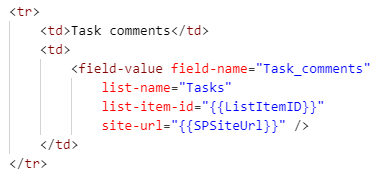
Here is an example of how this can be used in a PnP Handlebar Template:
 umeaworks